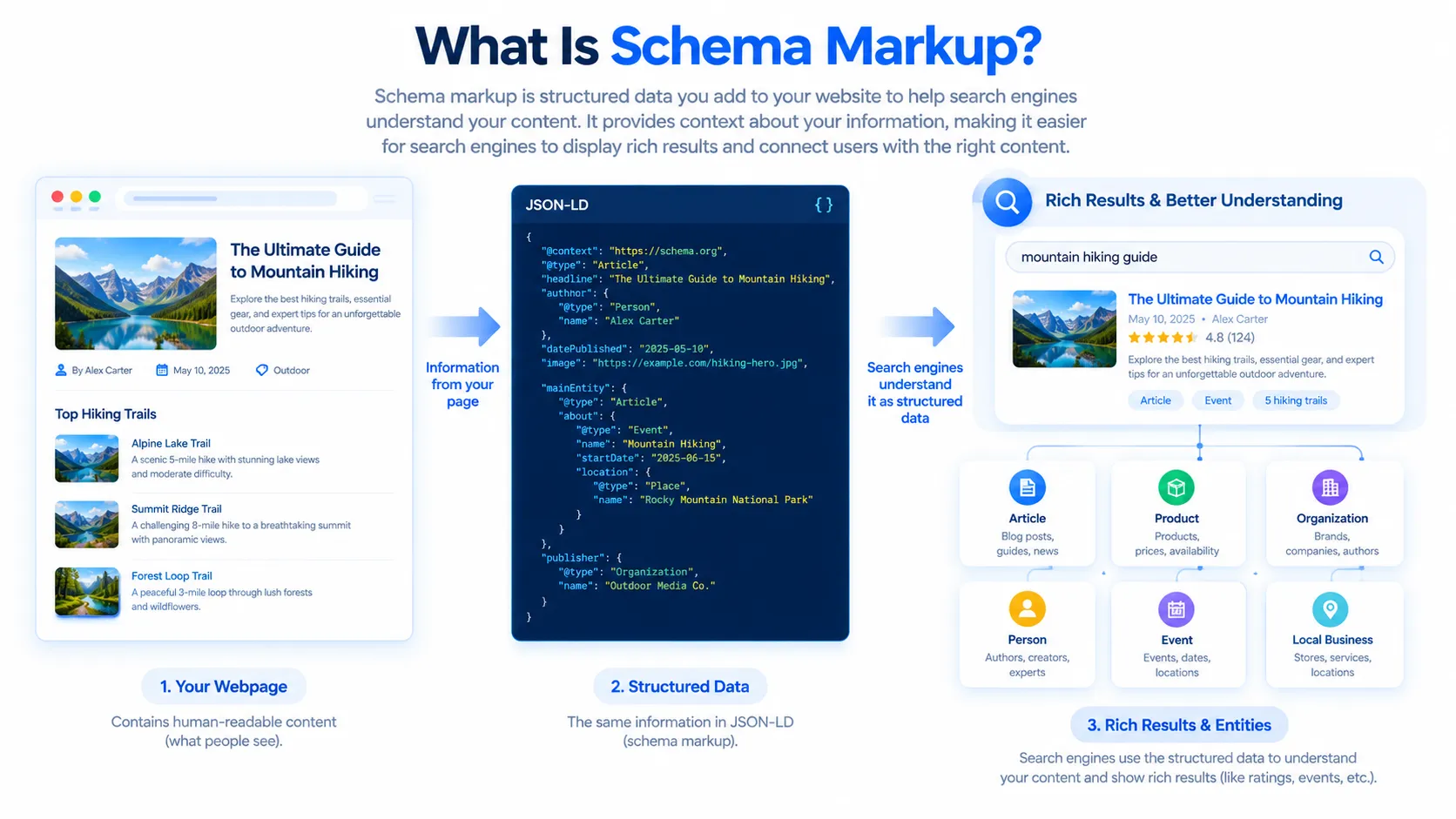


If you want search engines to better understand your website, schema markup is one of the technical SEO concepts worth understanding.
A search engine can read the words on a webpage, but understanding exactly what those words represent can be more complicated. For example, a page might contain a business name, address, telephone number, opening hours, product price, author name, article date, event date, or customer rating. Schema markup helps describe that information in a standardized, machine-readable way.
Schema markup is based on the vocabulary provided by Schema.org, which can be used with formats such as JSON-LD, Microdata, and RDFa. Schema.org describes types of things such as organizations, people, products, events, places, recipes, articles, and many other entities.
For website owners, schema markup is especially useful because Google uses structured data to understand page content and, for supported features, may use it to make pages eligible for enhanced search-result appearances called rich results. However, adding schema does not guarantee higher rankings or guarantee that a rich result will appear.
In this complete guide, you will learn:
- What schema markup is
- How schema markup works
- What Schema.org is
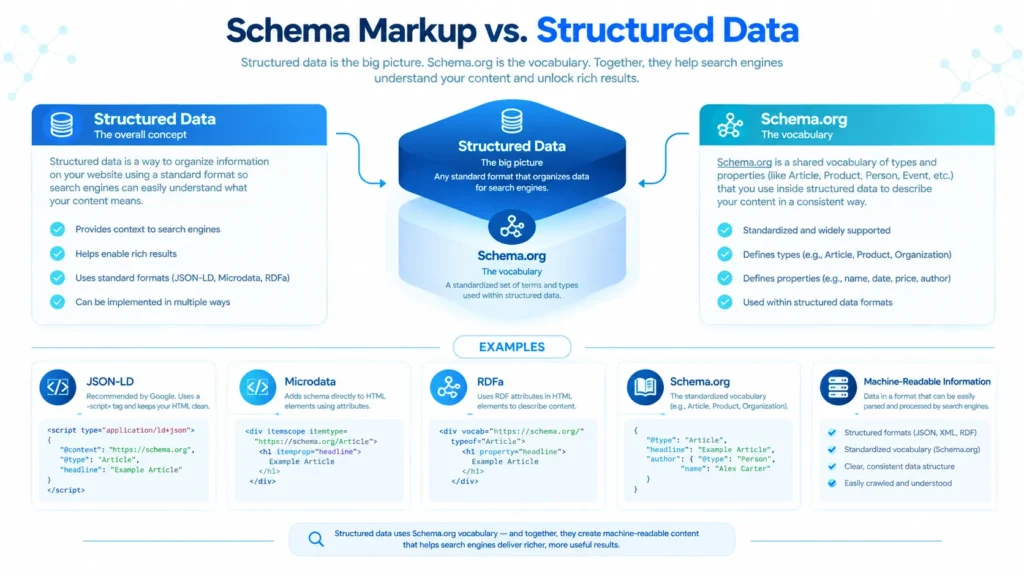
- The difference between schema markup and structured data
- Why schema markup is useful
- Whether schema markup improves Google rankings
- The most common schema types
- What JSON-LD is
- How to add schema markup to a website
- How to add schema markup to WordPress
- How to add schema manually
- How to test schema markup
- Common schema markup mistakes
- Schema markup best practices
- Schema markup and AI search
- Frequently asked questions about schema markup
What Is Schema Markup?
Schema markup is structured data that uses a standardized vocabulary to describe the meaning and properties of information on a webpage.
In simple terms, schema markup gives search engines additional context about your content.
Imagine that your website contains this text:
ABC Digital Agency
123 Main Street, Lahore
Open Monday to Friday
Phone: +92 300 1234567
A person can easily understand that this information describes a business. A search engine can also understand much of it from the page, but structured data can explicitly describe the entities and properties.
For example, schema markup can communicate that:
- ABC Digital Agency is an organization.
- The organization has a specific name.
- It has a particular address.
- It has a telephone number.
- It has opening hours.
- It has a website URL.
Schema.org provides the vocabulary for describing these concepts, while formats such as JSON-LD, Microdata, and RDFa provide ways to place that vocabulary into webpages.
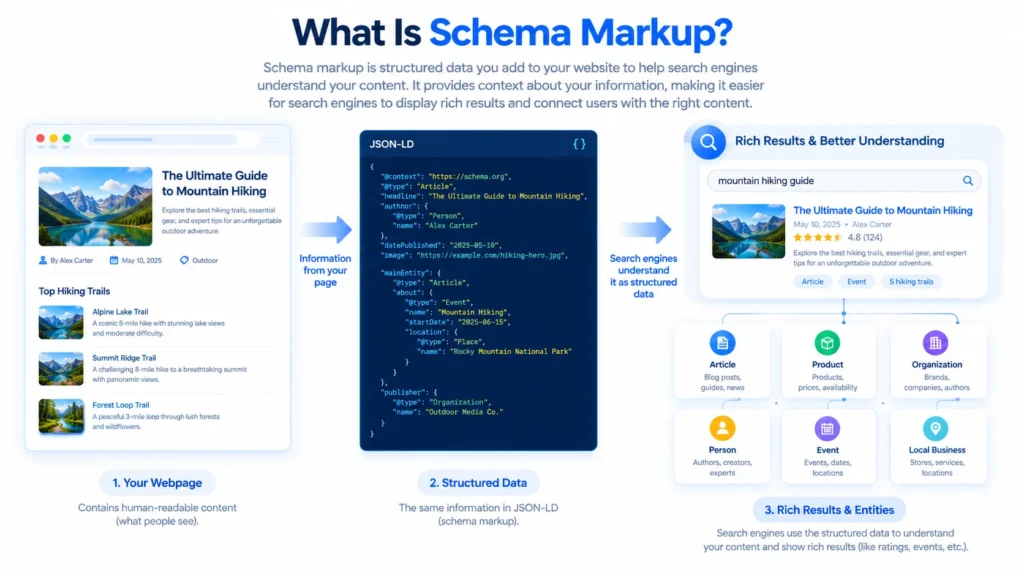
his is why schema markup is often described as a communication layer between your website and machines.
A simple definition
Schema markup is code added to a webpage that helps search engines understand what the content represents and what different pieces of information mean.
What Is Structured Data?
You will often see the terms schema markup and structured data used together. They are closely related, but technically they are not exactly the same thing.
Structured data is information organized in a standardized format so that machines can process and understand it.
Schema.org provides a vocabulary that can be used to describe entities and relationships.
Schema markup generally refers to implementing that vocabulary as structured data on a webpage.
For example:
{
  "@context": "https://schema.org",
  "@type": "Organization",
  "name": "Example Company",
  "url": "https://example.com"
}
Here:
@contextidentifies the vocabulary.@typeidentifies what the entity is.namedescribes the entity’s name.urlidentifies the entity’s website.
Schema.org organizes information into types, properties, and values, allowing different entities to be described and connected.
What Is Schema.org?
Schema.org is a collaborative vocabulary for structured data.
It provides standardized types and properties that websites can use to describe their content.
Some common Schema.org types include:
OrganizationLocalBusinessPersonProductArticleBlogPostingEventRecipeVideoObjectReviewAggregateRatingProfilePage
Schema.org’s vocabulary is broader than the structured-data features that Google currently supports for search-result enhancements. This distinction is important.
Just because a type or property exists on Schema.org does not automatically mean Google will display a special rich result for it.
Google maintains its own documentation describing the structured-data features it supports in Search. Its current list includes features such as Article, Breadcrumb, Event, Local Business, Organization, Product, Profile Page, Recipe, Review Snippet, Software App, Video, and others.
A good content architecture
I would structure your website something like this:
SCHEMA MARKUP
│
├── What Is Schema Markup?
│
├── Schema Markup Types
│   ├── Local Business Schema
│   ├── Product Schema
│   ├── Article Schema
│   ├── Organization Schema
│   ├── Person Schema
│   ├── Event Schema
│   ├── Recipe Schema
│   └── JobPosting Schema
│
├── How To Add Schema
│   ├── WordPress
│   ├── HTML
│   ├── JSON-LD
│   ├── JavaScript
│   └── Without Plugin
│
├── Schema Testing
│   ├── Rich Results Test
│   ├── Search Console
│   ├── Validation
│   └── Error Fixing
│
└── Schema + AI Search
    ├── AI Overviews
    ├── AI Mode
    ├── AEO
    ├── GEO
    └── AI Search SEO
How Does Schema Markup Work?
Schema markup works by describing information on a webpage using machine-readable properties.
Suppose you publish an article titled:
What Is Schema Markup?
You can use Article or BlogPosting structured data to identify:
- The article headline
- Author
- Publication date
- Modified date
- Article image
- Article URL
A simplified example looks like this:
{
  "@context": "https://schema.org",
  "@type": "BlogPosting",
  "headline": "What Is Schema Markup?",
  "author": {
    "@type": "Person",
    "name": "John Doe"
  },
  "datePublished": "2026-09-24",
  "dateModified": "2026-09-24"
}
This doesn’t replace the visible article. Instead, it provides additional structured information about the page.
Google’s Article documentation says Article structured data can help Google understand an article and potentially use information such as its title, images, and dates in Search and other Google properties.
Why Is Schema Markup Useful?
Why is Schema Markup useful?
Schema markup is useful because it gives search engines explicit information about the entities and content on your webpage.
There are several important reasons to use it.
1. It helps search engines understand your content
A webpage contains information intended primarily for humans. Structured data provides additional machine-readable context.
For example, a number such as $99 could represent a product price, a service price, a discount, or something else.
With appropriate structured data, the meaning can be expressed more explicitly.
Schema.org explains that its vocabulary allows webmasters to describe things such as movies, people, places, products, events, organizations, and other entities in ways that can be understood by search engines and applications.
2. It can make pages eligible for rich results
One of the biggest SEO reasons people implement schema markup is the possibility of qualifying for supported enhanced search-result features.
Depending on the content and Google’s current requirements, supported structured data can be associated with features such as:
- Product results
- Review snippets
- Article results
- Event results
- Recipe results
- Local business information
- Breadcrumbs
- Profile pages
- Video results
Google’s structured-data documentation makes clear that structured data can make pages eligible for certain rich-result features, but eligibility does not mean Google will always display the enhancement.
3. It can provide more context about important entities
Schema markup can describe relationships between entities.
For example, an article can identify its:
- Author
- Publisher
- Image
- Publication date
- Main topic
A product can identify:
- Product name
- Brand
- Price
- Availability
- Reviews
An organization can identify:
- Name
- Logo
- Website
- Contact information
- Social profiles
This structured information can give search engines more context about the page.
4. It can improve the machine readability of your website
Modern search is increasingly dependent on systems that need to understand entities, relationships, and content rather than simply matching individual keywords.
Structured data is one way of communicating information in a standardized format.
However, schema should be considered supporting technical information, not a replacement for useful content.
5. It helps you implement search features according to Google’s requirements
Google provides documentation for individual structured-data features. If your website qualifies for a particular feature, implementing the appropriate markup can provide the information Google needs to understand that content.
For example, Google provides specific guidance for Product structured data, including information such as price and availability for eligible merchant experiences.
Does Schema Markup Improve Google Rankings?
This is one of the most common schema questions.
Schema markup is not a guaranteed direct ranking boost.
Adding structured data does not mean your page will automatically move from position 10 to position 1.
Its main purpose is to help search engines understand your content and, where supported, make your page eligible for enhanced search-result features.
Google’s documentation describes structured data primarily in terms of helping Google understand page content and qualifying pages for rich-result features.
Therefore, don’t use schema as a shortcut around the fundamentals of SEO.
You still need:
- Helpful content
- Good page structure
- Relevant keywords and topics
- Crawlable pages
- Internal links
- Good titles and headings
- Quality backlinks where appropriate
- Good technical SEO
- A strong user experience
- Accurate and trustworthy information
Think of schema as additional context, not a magic ranking button.
Schema Markup vs Rich Results
These terms are often confused.
Schema markup
Schema markup is the structured information you add to a webpage.
Rich result
A rich result is an enhanced presentation that Google may show in Search when a page meets the relevant requirements.
For example, a product page might be eligible for a search appearance containing product information such as price or availability.
Google explicitly states that it does not guarantee that structured-data features will appear even when markup has been implemented correctly.
So the relationship is:
Schema markup → helps Google understand content → may provide eligibility for supported search features.
What Is JSON-LD?
JSON-LD stands for JavaScript Object Notation for Linked Data.
It is currently one of the most convenient ways to implement schema markup.
A JSON-LD block commonly looks like this:
<script type="application/ld+json">
{
  "@context": "https://schema.org",
  "@type": "Article",
  "headline": "What Is Schema Markup?"
}
</script>
Google recommends JSON-LD because it is generally easier for website owners to implement and maintain. Google also supports other structured-data formats when they are valid and implemented according to the relevant documentation.

Why many SEOs prefer JSON-LD
JSON-LD has several practical advantages:
- It is relatively easy to read.
- It separates structured data from visible HTML.
- It is easier to maintain.
- It can be generated automatically by CMS plugins.
- It can describe multiple related entities.
- It is widely used in SEO implementations.
JSON-LD vs Microdata vs RDFa
Schema.org can be used with multiple syntaxes.
The three commonly discussed formats are:
1. JSON-LD
Example:
<script type="application/ld+json">
{
  "@context": "https://schema.org",
  "@type": "Organization",
  "name": "Example Company"
}
</script>
2. Microdata
Microdata places attributes directly into HTML elements.
Example:
<div itemscope itemtype="https://schema.org/Organization">
  <span itemprop="name">Example Company</span>
</div>
3. RDFa
RDFa also adds machine-readable attributes to HTML.
Schema.org documents all three approaches, while Google recommends JSON-LD as the generally easiest format to implement and maintain.
For most WordPress users, JSON-LD is the easiest choice.
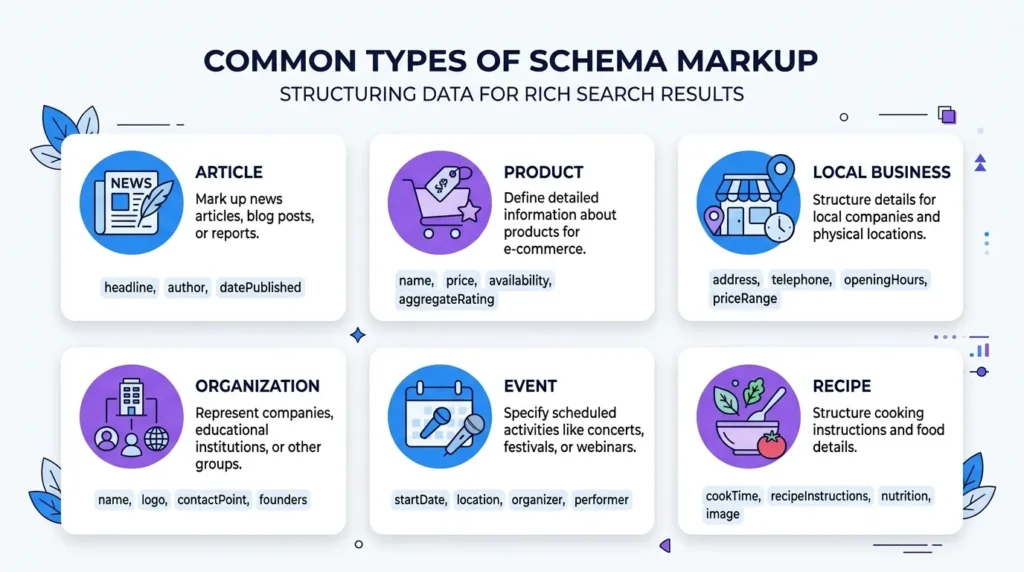
Common Types of Schema Markup
You should not add every possible schema type to every webpage.
The correct approach is to use structured data that accurately describes the content on that particular page.
Here are some common types.
Article Schema
Article structured data is useful for article pages such as blogs, news articles, and other editorial content.
Common information includes:
- Headline
- Author
- Publication date
- Modified date
- Image
Google supports Article, NewsArticle, and BlogPosting for its Article structured-data feature.
Product Schema
Product structured data is useful for ecommerce and product pages.
It can describe information such as:
- Product name
- Brand
- Image
- Price
- Availability
- Reviews
- Ratings
Google says Product structured data can make eligible pages appear in merchant listing experiences and product-related search features.
Local Business Schema
Local Business structured data can describe businesses with information such as:
- Business name
- Address
- Phone number
- Opening hours
- URL
- Business type
This can be particularly relevant for businesses serving customers at physical locations.
Organization Schema
Organization structured data describes an organization or company.
Possible properties include:
- Name
- Logo
- URL
- Contact information
- Address
- Social profiles
Google recommends putting Organization markup on the homepage or a single page describing the organization, rather than automatically duplicating the exact same organization markup everywhere.
Breadcrumb Schema
Breadcrumb structured data can describe the hierarchy of a website.
For example:
Home > SEO > Technical SEO > Schema MarkupThis can help search engines understand the relationship between the current page and its categories or parent pages.
Event Schema
Event structured data is designed for event pages.
It can describe:
- Event name
- Start date
- End date
- Location
- Description
- Event status
- Offers/ticket information where applicable
Google has specific requirements for Event structured data, so you should follow its current documentation rather than copying a generic Event schema template.
Recipe Schema
Recipe structured data can describe:
- Recipe name
- Image
- Ingredients
- Cooking time
- Preparation time
- Nutrition
- Instructions
- Ratings
Google provides specific required and recommended properties for eligible recipe features.
ProfilePage Schema
ProfilePage structured data can describe pages focused on a person or organization.
Google provides support for ProfilePage structured data and requires the mainEntity to identify the person or organization the profile page is about.
How to Add Schema Markup to Your Website
There are several ways to add schema markup.
The right method depends on your website platform and technical skills.
The basic process is:
Choose the correct schema → create the structured data → add it to the page → test it → monitor it.
Let’s look at each step.
Step 1: Identify the Type of Page
Before creating schema markup, determine what your page actually represents.
For example:
| Page | Potential Schema |
|---|---|
| Blog post | Article / BlogPosting |
| Product page | Product |
| Company page | Organization |
| Local business page | LocalBusiness |
| Event page | Event |
| Recipe | Recipe |
| Author profile | ProfilePage |
| Video page | VideoObject |
Don’t choose schema just because it sounds useful.
The markup should accurately represent the content on the page.
Schema.org also advises marking up information that is actually represented on the page rather than adding hidden or unrelated information.
Step 2: Choose the Appropriate Schema Properties
Once you know the schema type, identify the properties relevant to your page.
For an Article, you might use:
@type
headline
author
datePublished
dateModified
image
For a Product, you might use:
name
image
description
brand
offers
aggregateRating
review
However, don’t blindly copy every possible property.
Google’s documentation distinguishes between required and recommended properties depending on the structured-data feature. Some types have required properties for eligibility, while others primarily use recommended properties.
Step 3: Create the JSON-LD
Here is a simple Article example:
<script type="application/ld+json">
{
  "@context": "https://schema.org",
  "@type": "BlogPosting",
  "headline": "What Is Schema Markup? How to Add Schema Markup to Your Website",
  "author": {
    "@type": "Person",
    "name": "Your Author Name"
  },
  "datePublished": "2026-09-24",
  "dateModified": "2026-09-24",
  "image": "https://example.com/images/schema-markup.jpg"
}
</script>
Replace the example values with the actual information from your website.

Do not copy this example and leave fake information in it.
Step 4: Add Schema Markup to Your Website
You have several options.
Method 1: Use a WordPress SEO Plugin
For WordPress websites, this is usually the easiest method.
Many modern SEO and schema plugins can automatically generate structured data based on your:
- Website type
- Posts
- Pages
- Authors
- Products
- Organization information
This means you may not need to manually write JSON-LD for every article.
However, always check what your plugin is generating.
A common problem is installing multiple SEO/schema plugins that generate overlapping structured data.
For example:
Plugin A → Article schema
Plugin B → Article schema
Custom code → Article schema
This can create unnecessary duplication.
Before adding manual schema, inspect your page source and determine whether your existing SEO plugin or theme already generates it.
Method 2: Add JSON-LD Manually
If you understand HTML and JSON-LD, you can add the code manually.
A JSON-LD block can look like:
<script type="application/ld+json">
{
  "@context": "https://schema.org",
  "@type": "Article",
  "headline": "Your Article Title",
  "author": {
    "@type": "Person",
    "name": "Your Name"
  }
}
</script>
This method gives you more control, but it also means you are responsible for keeping the data accurate.
If the article title changes, the structured-data headline should also remain accurate.
If you update the publication date or author information, review your markup as well.
Method 3: Use WordPress Custom HTML
WordPress provides a Custom HTML block that lets you add HTML code directly to content. WordPress documentation explains that the Custom HTML block is designed for adding custom HTML code.
However, you should be careful about putting <script> blocks inside post content.
Depending on your WordPress setup, permissions, security configuration, theme, and plugins, script elements may be restricted or sanitized.
For site-wide schema, a dedicated SEO/schema plugin or a properly implemented theme/function is generally easier to manage.
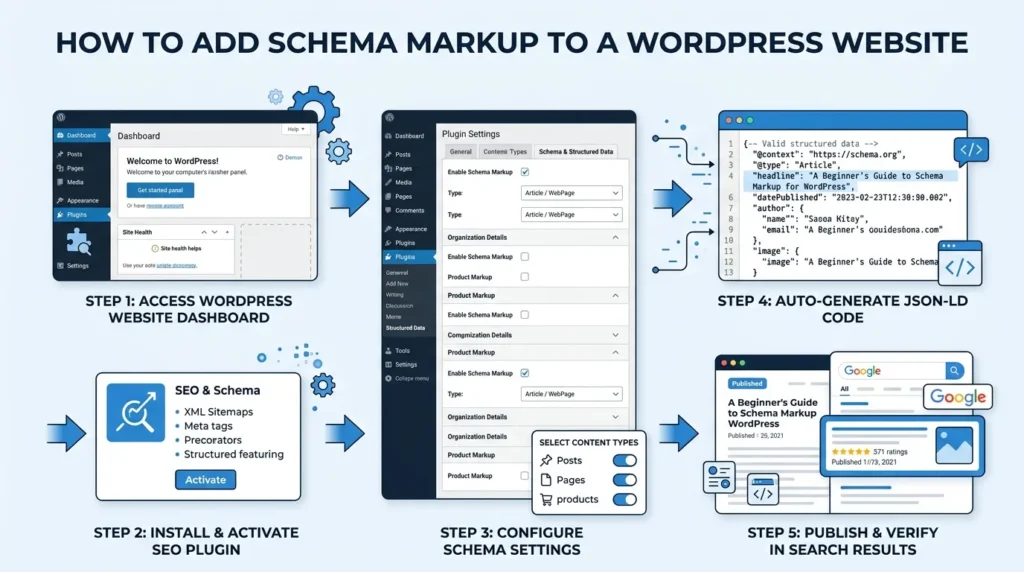
Method 4: Add Schema Through Your Theme or Development Code
Developers can generate JSON-LD programmatically.
For example, a WordPress developer can generate structured data based on:
- Post title
- Author
- Featured image
- Publication date
- Modified date
- Product information
- Organization information
This is particularly useful for large websites because manually maintaining hundreds or thousands of schema blocks is inefficient.
If schema is generated dynamically, make sure the output is valid and accurately reflects the page.
How to Add Schema Markup in WordPress
For most WordPress users, I recommend following this process:
Step 1
Install and configure one reliable SEO/schema solution.
Step 2
Configure your organization or website information.
Step 3
Configure your author information.
Step 4
Check the schema generated for your homepage.
Step 5
Check the schema generated for a blog post.
Step 6
Check product schema if you operate an ecommerce website.
Step 7
Avoid adding a second copy of the same schema manually unless you have a specific reason.
Step 8
Test your pages using Google’s structured-data testing tools.
The goal is not to generate the largest possible amount of schema.
The goal is to generate accurate, relevant structured data.
Schema Markup Example for a Blog Article
For this article, an appropriate starting point could look like:
{
  "@context": "https://schema.org",
  "@type": "BlogPosting",
  "headline": "What Is Schema Markup? How to Add Schema Markup to Your Website",
  "description": "Learn what schema markup is, why it is useful for SEO, and how to add schema markup to your website.",
  "author": {
    "@type": "Person",
    "name": "Author Name"
  },
  "datePublished": "2026-09-24",
  "dateModified": "2026-09-24",
  "image": [
    "https://example.com/images/schema-markup.jpg"
  ]
}
For a real website, replace:
Author Namewith the actual author and:
https://example.com/images/schema-markup.jpgwith the actual image URL.
Google recommends that Article images represent the article and that image URLs are crawlable and indexable. Google also recommends providing suitable high-resolution images for Article structured data.
How to Test Schema Markup
Adding schema is only half the job.
You should test it after implementation.
Google recommends using the Rich Results Test to validate structured data and identify critical errors. Google also recommends checking how Google sees the page with URL Inspection and monitoring the results after deployment.
Basic testing process
- Publish or save your page.
- Open Google’s Rich Results Test.
- Enter your webpage URL or code.
- Run the test.
- Review errors.
- Review warnings.
- Fix important issues.
- Test again.
- Use Google Search Console to monitor the page.
A valid result does not guarantee that Google will display a rich result.
Google specifically notes that structured-data features are not guaranteed to appear in Search even when the implementation is valid.
Schema Markup Errors You Should Avoid
1. Using incorrect information
Never use fake information just to qualify for a rich result.
If your page says one thing and your structured data says another, you have created an inconsistency.
Your schema should accurately represent the page.
2. Adding schema that doesn’t match the content
Don’t add Product schema to an ordinary informational article simply because Product rich results look attractive.
Likewise, don’t add Recipe schema to a page that isn’t actually a recipe.
3. Adding hidden information
Schema should not be used as a way to secretly tell search engines information that visitors cannot find on the page.
Schema.org’s guidance recommends marking up information represented on the page rather than relying on hidden content.
4. Using every schema type
More schema does not automatically mean better SEO.
A page might legitimately contain several related entities, but you should use structured data that describes the actual page.
Quality and accuracy matter more than quantity.
5. Creating duplicate schema
If your WordPress SEO plugin already creates Article schema, adding another Article schema manually can create unnecessary duplication.
Before adding custom code, inspect what your existing theme and plugins are already generating.
6. Ignoring Google’s feature-specific requirements
Schema.org may contain a property that looks correct, but Google may have specific requirements for a particular Search feature.
Always check the relevant Google Search Central documentation before implementing important structured data.
Schema Markup Best Practices
Here are practical rules you can follow.
Use the most appropriate schema type
Choose the type that accurately describes your content.
Use accurate information
Your schema should reflect what visitors can see and understand from the page.
Keep information updated
If your product price, article date, business address, or other important information changes, your structured data should remain accurate.
Prefer JSON-LD for most implementations
Google describes JSON-LD as generally easier to implement and maintain.
Test before publishing at scale
If you’re adding schema to hundreds or thousands of pages, test a sample first.
Monitor Search Console
After implementation, monitor structured-data-related reports and search performance.
Don’t expect guaranteed rich results
Valid structured data creates eligibility where applicable; it does not guarantee a specific search appearance.
Schema Markup and AI Search
Schema markup is also frequently discussed in relation to AI search, AI Overviews, and AI-powered search experiences.
There is an important distinction here.

You should not think of schema markup as a special code that automatically gets your website into AI-generated answers.
Google’s guidance for AI features emphasizes that the fundamental SEO requirements still matter. There isn’t a special schema markup that website owners must add specifically to appear in Google’s AI features.
Structured data can still help search engines understand content, but it should be part of a broader SEO strategy rather than treated as an “AI ranking trick.”
Google’s Search documentation describes structured data as a way to help Google understand webpage content, while its AI-feature guidance focuses on foundational requirements and helpful, accessible content.
For websites preparing for AI-driven search, focus on:
- Clear explanations
- Accurate information
- Strong topical coverage
- Logical site architecture
- Crawlable pages
- Internal links
- Descriptive headings
- Original information
- Author information where appropriate
- Structured data that accurately describes your content
- Good technical SEO
Schema should support these efforts rather than replace them.
Is Schema Markup Necessary for Every Website?
No.
Not every webpage needs every type of schema markup.
For example, if you run a personal blog, you might primarily use:
- Article/BlogPosting
- Person
- Organization
- Breadcrumb
An ecommerce website may need:
- Product
- Offer
- Organization
- Breadcrumb
- Product-related structured data
A local business might use:
- LocalBusiness
- Organization
- Breadcrumb
- Product or Service-related markup where appropriate
The important thing is to match the markup to the content.
Should You Add Schema Markup to Every Page?
Not necessarily in the same way.
Some structured data can be appropriate across a site, while other types belong only on specific pages.
For example, Google recommends Organization markup on the homepage or a single organization-information page rather than requiring identical Organization markup on every page.
Likewise:
- Product schema belongs on relevant product pages.
- Recipe schema belongs on relevant recipe content.
- Event schema belongs on event pages.
- Article schema belongs on relevant articles.
Think page-by-page relevance, not “one schema fits all.”
Does Schema Markup Help Click-Through Rate?
It can potentially improve how eligible content is presented in Search, but you should not promise a specific increase in CTR.
For example, eligible Product structured data can help Google understand information such as price and availability for supported merchant experiences. Article structured data can help Google understand article titles, images, dates, and authors.
Whether that results in more clicks depends on many factors, including:
- Search intent
- Query
- Position
- Search-result layout
- Competitors
- Title
- Description
- Brand recognition
- Content quality
- The specific rich-result feature
So schema can contribute to a better search presentation, but it isn’t a guaranteed CTR increase.
Schema Markup for Ecommerce Websites
If you operate an online store, schema can be particularly important because product pages contain structured information that search engines need to interpret.
A product page may contain:
Product name
Brand
Description
Image
Price
Currency
Availability
SKU
Reviews
Ratings
Shipping
Return policy
Google’s current merchant listing documentation supports structured information around products and merchant information, including price, availability, shipping and return information in appropriate scenarios.
For ecommerce websites, it is important that your structured data stays synchronized with the actual product information.
For example, don’t mark a product as:
In Stockif the product page says:
Out of StockAccuracy is essential.
Schema Markup for Blog Websites
For a blog, Article or BlogPosting structured data is one of the most obvious implementations.
Useful properties can include:
headlineauthordatePublisheddateModifiedimage
Google’s Article documentation recommends relevant properties such as author, headline, and image to help Google understand article pages.
For a large editorial website, consistent author and article information can also make the site’s content structure easier to understand.
What About FAQ Schema?
FAQ content can still be useful for readers, and adding an FAQ section to an article can improve the usefulness of the page.
However, there is an important current Google Search change:
Google deprecated the FAQ rich-result feature, and the FAQ rich result stopped appearing in Google Search starting May 7, 2026.
Therefore, you should not publish an article today claiming that adding FAQPage schema will automatically produce FAQ dropdowns in Google Search.
You can still write useful FAQs for users, but don’t treat FAQ schema as a guaranteed Google rich-result strategy.
What About HowTo Schema?
Similarly, Google’s Search documentation has changed over time.
Google removed its How-to structured-data documentation because How-to rich results are no longer shown in Search.
This is a good example of why SEO advice should be kept up to date.
A schema type that was useful several years ago may not have the same Search feature today.
How Long Does It Take for Schema Markup to Appear in Google?
There is no guaranteed instant result.
After adding structured data, Google needs to:
- Discover the page.
- Crawl it.
- Process the structured data.
- Re-evaluate the page.
- Determine whether the page qualifies for a supported search feature.
- Decide whether to display that feature.
Google notes that it can take several days after publishing for Google to find and crawl pages.
This means you should not add schema and expect a rich result to appear immediately.
What Should You Do After Adding Schema Markup?
Use this simple checklist:
Schema Markup Checklist
- Identify the correct schema type.
- Use accurate information.
- Make sure the information corresponds to the page.
- Use JSON-LD where appropriate.
- Avoid duplicate schema.
- Validate the markup.
- Fix critical errors.
- Check Google Search Console.
- Make sure Google can crawl the page.
- Keep your structured data updated.
- Monitor search appearance.
- Don’t expect guaranteed rich results.
Google’s recommended workflow is to add the applicable properties, follow its guidelines, validate the markup with the Rich Results Test, test how Google sees the page with URL Inspection, and monitor the implementation after deployment.
Frequently Asked Questions About Schema Markup
What is schema markup in SEO?
Schema markup is structured data that provides search engines with additional information about the meaning and properties of webpage content. It uses standardized vocabularies such as Schema.org and can be implemented using JSON-LD, Microdata, or RDFa.
Is schema markup a ranking factor?
Schema markup should not be treated as a guaranteed direct ranking boost. Its primary purposes include helping search engines understand content and making eligible pages capable of appearing in supported rich-result features.
Is Schema.org the same as schema markup?
No. Schema.org is the vocabulary, while schema markup is the implementation of structured information using that vocabulary.
What is the best schema format?
For most website owners, JSON-LD is the easiest format to implement and maintain. Google recommends JSON-LD for this reason, while also supporting other valid formats.
How do I add schema markup to WordPress?
You can add it through an SEO/schema plugin, your theme or custom development, or manually using JSON-LD. Before adding manual markup, check whether your existing WordPress plugins already generate structured data.
Can schema markup improve SEO?
It can support SEO by helping search engines understand your content and, for eligible pages, enabling supported enhanced search-result features. However, schema alone is not a substitute for high-quality content and sound technical SEO.
Does schema markup help Google AI Overviews?
There is no special schema markup that guarantees inclusion in Google AI Overviews or other AI search features. Structured data can help Google understand webpage content, but AI search visibility depends on broader search systems and content/technical factors.
Does every website need schema markup?
No. The useful schema types depend on what your website and individual pages contain.
Can I add multiple schema types to one page?
Yes, a page can contain multiple related structured-data entities when they accurately represent the content. The important point is that the markup should be relevant, accurate, and properly implemented.
Does schema markup guarantee rich results?
No. Google explicitly states that structured-data features are not guaranteed to appear even when the markup is valid.
How can I check whether my schema markup works?
Use Google’s Rich Results Test to validate eligible structured data, then use Google Search Console and URL Inspection to check how Google sees your page.